


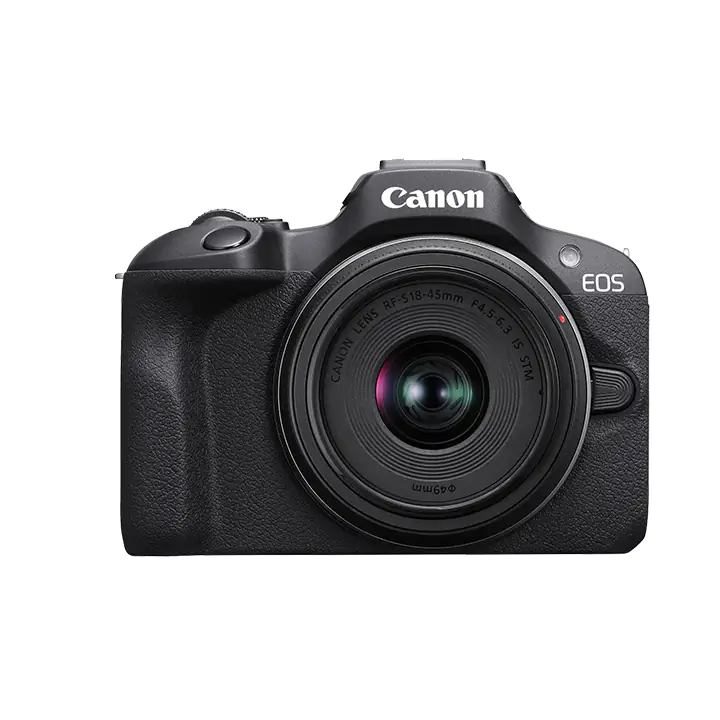



| Type | Type: Digital interchangeable lens, mirrorless camera Image Processor: DIGIC 8 Recording Media: (One) SD card slot Compatible with UHS-I Eye-Fi cards and Multimedia cards (MMC) are not supported. Lens Mount: Canon RF mount Compatible Lenses:Canon RF lens group (including RF-S lenses) * When using Mount Adapter EF-EOS R: Canon EF or EF-S lenses (excluding EF-M lenses) * Note that control ring of the Control Ring Mount Adaptor EF-EOS R does not function. * EXTENDER RF1.4x / RF2x is not compatible. (EXTENDER EF1.4x / EF2x is compatible when used with the Mount Adaptor.) * RF5.2mm F2.8 L DUAL FISHEYE and RF85mm F1.2 L USM DS are not compatible. |
| Image Sensor | Type: APS-C CMOS sensor (compatible with Dual Pixel CMOS AF) Effective pixels: Approx. 24.1 megapixels Screen Size: Approx. 22.3×14.9 mm Pixel Unit: Approx. 3.72 µm square Total Pixels: Approx. 25.8 megapixels Aspect Ratio: 3:2 (Horizontal: Vertical) Color Filter System: RGB primary color filters Low Pass Filter: Not provided Dust Deletion Feature: Self Cleaning Sensor Unit not provided. Manual cleaning (by hand) not supported. Dust Delete Data acquisition and appending • The coordinates of the dust adhering to the low-pass filter are detected by a test shot and appended to subsequent images. • The dust coordinate data appended to the image is used by the EOS software to automatically erase the dust spots. |
| Viewfinder | Type: OLED color electronic viewfinder; 0.39-inch, approx. 2.36 million dots Coverage: Approx. 100% (at JPEG Large image quality, 3:2 aspect ratio, approx. 22 mm eyepoint) Magnification / Angle of View: Approx. 0.95×/28.0° (3:2 aspect ratio, with 50mm lens at infinity, –1 m–1) Eye Point: Approx. 22 mm (at –1 m–1 from eyepiece lens end) Dioptric Adjustment Range: Approx. –3.0 to +1.0 m–1 (dpt) Viewfinder Information: Users can customize and select whether to use the following three display elements. • Live View + basic information display • Live View + detailed information display • Live View + detailed information display + histogram |
| Autofocus | Focus Method: Still photo shooting: Dual Pixel CMOS AF Available Subject Detection: People / Eye Eye Detection: Auto - The eye closer to the camera is selected (as detected from the angle of the face). Changed Manually - Other eyes can be selected with the left and right cross keys after pressing the AF point selection button. - Faces are selected when another subject’s eyes cannot be detected. |
| Shutter | Type: Electronically controlled focal-plane shutter * Electronic 1st / mechanical 2nd curtain * Except in silent shutter mode Rolling shutter, using the image sensor * Electronic shutter * In silent shutter mode Shutter Speed / X-sync Speed: Creative Zone: 1/4000–30 sec.,*1 Bulb*2 Basic Zone: 1/4000–1 sec.*3 Maximum flash sync speed: 1/250 sec. *1: In 1/3-stop increments *2: In manual shooting mode only *3: Varies by mode. Shutter Release: Soft-touch electromagnetic release Self Timer: 10-sec. delay, 2-sec. delay, Continuous |
| Image Stabilization (IS mode) | In-body IS not provided. Still Photo IS not suppored. |
| LCD Screen | Type: TFT color, liquid-crystal monitor Monitor Size: 3.0-inch (screen aspect ratio of 3:2) 2.95 in./7.5cm diagonal (2.44 in./6.2cm width, 1.65 in./4.2cm height) Dots: Approx. 1.04 million dots Coverage: Approx. 100% vertically/horizontally Brightness Control: Manually adjustable in a range of 1–7 Touch-screen Operation: Not provided Coating: Anti-smudge coating not provided. Anti-reflection coating not provided. Interface Languages: 29 (English, German, French, Dutch, Danish, Portuguese, Finnish, Italian, Ukraine, Norwegian, Swedish, Spanish, Greek, Russian, Polish, Czech, Hungarian, Vietnamese, Hindi, Romanian, Turkish, Arabic, Thai, Simplified/Traditional Chinese, Korean, Malay, Indonesian, Japanese) |
| Quick Control Function | Function: The Quick Control screen can be accessed by pressing the Quick Control button during still photo shooting, movie recording, or playback. Quick Control Screen: Displayable * Only the conventional Quick Control screen |
| Wireless Connections | Images can be sent via Wi-Fi to a PictBridge-compatible (wireless LAN) printer and printed. |
| Wi-Fi | Supporting Standards: Equivalent to IEEE 802.11b/g/n Standards Transmission Method: DS-SS modulation (IEEE 802.11b) OFDM modulation (IEEE 802.11g/n) |
| Bluetooth | Standards Compliance: Bluetooth Specification Version 4.2 compliant (Bluetooth Low Energy technology) Transmission Method: GFSK modulation Bluetooth Pairing: Smartphone — up to 10 devices; BR-E1 remote controller — 1 unit |
| DPOF: Digital Print Order Format | Compliant to DPOF Version 1.1 |
| Interface | USB Terminal: Equivalent to Hi-Speed USB (USB 2.0) • For PC communication • Terminal type: USB Type-C * Cannot be connected to a printer * Not for communication with smartphones * Charging and powering the camera via USB are not supported HDMI Out Terminal: HDMI micro OUT terminal (Type D) * Resolution switches automatically * HDMI CEC not supported * Images not displayed unless [For NTSC] or [For PAL] is set correctly for the TV video system Clean HDMI Output: Provided Microphone terminal: 3.5mm diameter stereo mini jack Headphone terminal: Not provided. |
| Power Source | Battery: Canon LP-E17 battery pack • With the AC Adapter AC-E6N + DC Coupler DR-E18, AC power is possible (AC Adapter Kit ACK-E18 can also be used). Optional Battery Grip: Not supported Battery Check: Automatic battery check with 4-level display when the power switch is turned ON. Start-up Time: Approx. 0.9 sec. Based on CIPA testing standards. |
4/5
Based on 1 reviews.
Sandy Forbes
Jun. 11, 2024 Gift to husband
My husband likes it, so many things you can do with it, bigger the manual, more you can do with the product. Great gift, he loves it. |